2026 · Windows, networking
Two machines, two hours apart
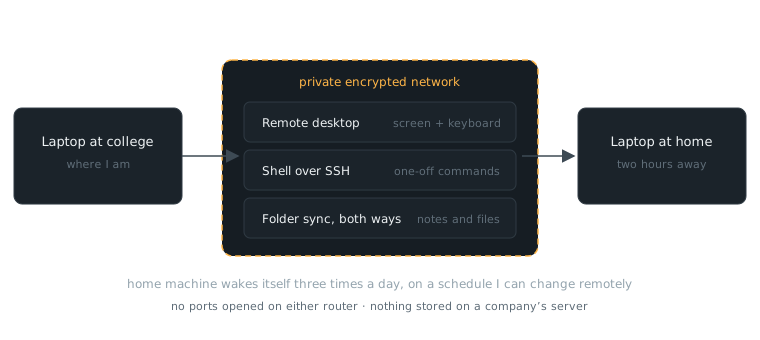
My home laptop, reachable from campus, without opening a single port.
The machine at home sleeps until it wakes itself on a schedule. From campus I can take over its screen, run a command on it, or drop a file in a folder and watch it appear on the other side. The two are joined by a private encrypted network, so nothing is exposed to the open internet and no company holds my files.
Almost none of this worked the first time, and none of the failures printed an error. The machine simply did not wake up, and there was nothing to read.
Waking it took five fixes stacked on top of each other, and four of them were symptoms. The real cause was a second sleep timeout Windows does not show in its settings screens at all — you can only see it by asking the power tool to dump hidden values. It applies specifically when the computer wakes for a scheduled task, and it was putting the machine back to sleep about two minutes after every successful wake. Along the way I also found that the sleep command most of the internet recommends silently turns wake-ups off, because of how its arguments land on the real function underneath.
The lesson I actually keep: when a system fails silently, stop trusting what it displays. My file sync looked perfectly healthy in its own window for ten days while it copied nothing, after an update quietly left it running under a blank identity. Now I check that a real file moved, not that the screen looks fine.
no ports openedwakes on schedule, 3×/dayscreen, shell and file syncfive stacked bugs, one root causeevery failure silent